Right now there are plenty of desktop operating system available in the market, some of them are free and others are paid. The free ones inc...

Right now there are plenty of desktop operating system available in the market, some of them are free and others are paid. The free ones include Linux distros like Ubuntu, etc. Whereas, the paid one includes Windows. What’s interesting is that each of the operating systems has its own sets of versions and features.
Now that there are plenty of desktop operating systems available in the market, it doesn’t make sense to waste a USB drive for installing just one operating system. You can actually run multiple operating systems from a single USB flash drive. Yes, you read that right! You can put all the ISO files of the operating system on a flash drive and make it a multiboot USB.
That means a single USB drive can host Windows ISO as well as Live Linux distribution. Not only the ISO files, but you can also create Multiboot USB drive to host Antivirus rescue disk as well. So, in this article, we have shared a few best methods to create multiboot USB media.
#1 MultiBootUSB
MultiBootUSB is one of the best software for creating multiboot USB media. The great thing about MultiBootUSB is that its a portable tool and can be run directly from the USB drive. To use MultiBootUSB, follow some of the simple steps given below.
Step 1. First of all, download & install MultiBootUSB on your computer.
Step 2. Once installed, open the software and you need to select the USB disk. From the right-hand side, you need to select the ISO image file.
Step 3. Once done, you need to click on the ‘Install Distro’ button.
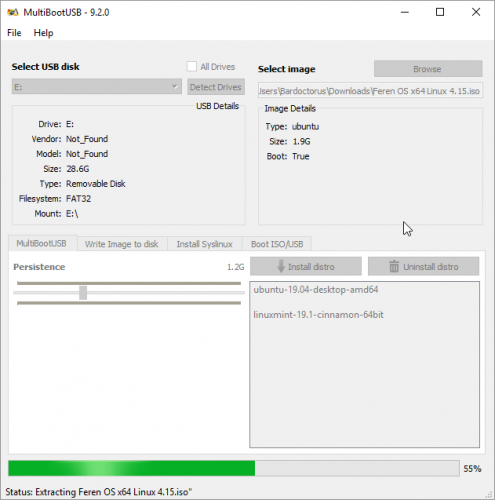
Step 4. To text the multiboot USB without restarting, you can utilize the QEMU virtualization. It allows users to test both the Linux ISO and USB stick.
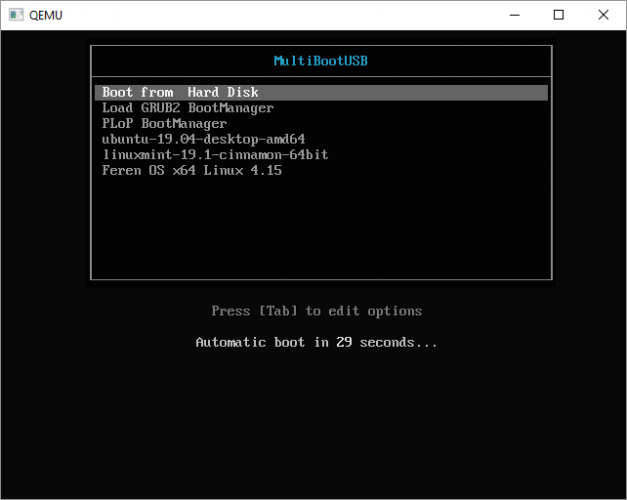
That’s it, you are done! This is how you can use MultiBootUSB to install Multiple Bootable operating systems on a USB Stick.
#2 XBoot
XBoot is another best portable media making tool that you can use right now. The portable software is easy to use and it does its job pretty well. To use XBoot, follow some of the simple steps given below.
Step 1. First of all, download and install XBoot on your computer.
Step 2. Once done, open the software and add your ISO files. You can drag and drop the ISO files on the main box.
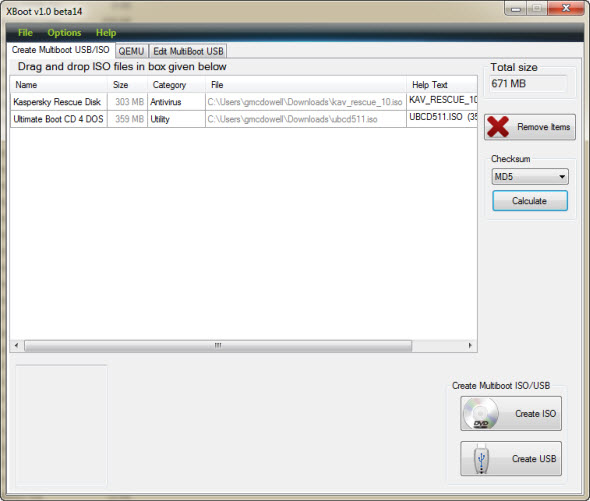
Step 3. Once done, click on the ‘Create’ USB Button.
Step 4. In the next step, you will be asked to select the USB Drive and bootloader. Don’t make changes to the Bootloader if you want to make your USB stick bootable.
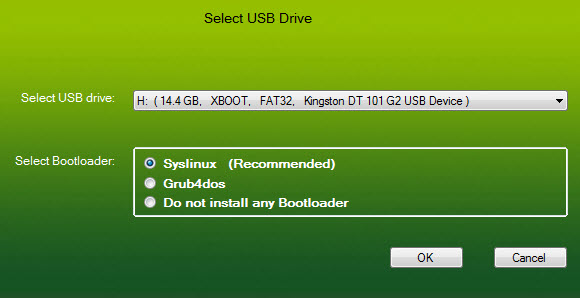
Step 5. Now, wait for few minutes until XBoot creates the Bootable USB.

That’s it, you are done! This is how you can use XBoot to install Multiple Bootable OS on a USB Stick.
#3 Yumi
YUMI which stands for Your Universal Multiboot installer is another best tool to create multiple booting USB drives. The software is extremely easy to use and it lists lots of Linux distro. You can either browse the ISO on your hard drive or follow the download links provided by the Yumi. To create multiple bootable Operating system with Yumi, follow some of the simple steps given below.
Step 1. First of all, download & install Yumi on your computer.
Step 2. Launch the tool and select the USB drive. Next, select the distribution which you want to put in the Bootable USB stick.
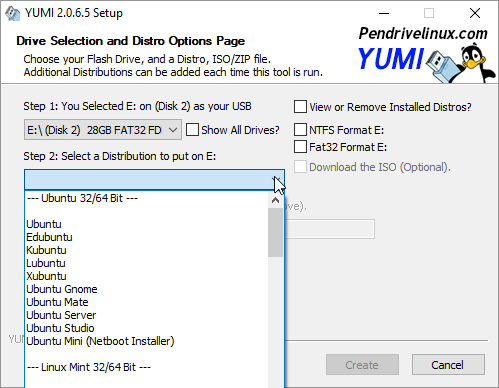
Step 3. In the next step, you need to browse the ISO file for the operating system and then click on the ‘Create’ button.
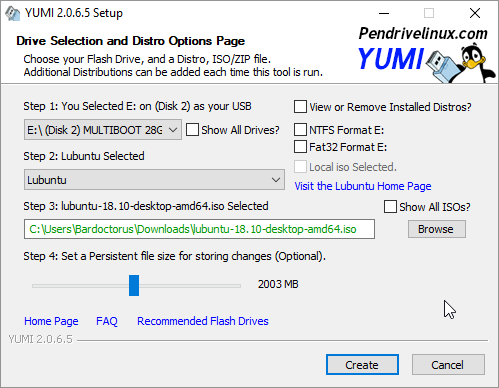
That’s it, you are done! This is how you can create multiple bootable operating systems on one USB.
#4 WinSetupFromUSB
WinSetupFromUSB is one of the top-rated tools for installing Windows and Linux in a single USB stick. The software is extremely easy to use and lightweight. Check out how to use WinSetupFromUSB to create multiboot USB drive.
Step 1. First of all, download & install WinSetupFromUSB on your computer.
Step 2. Once installed, open the tool and from select your USB disk.
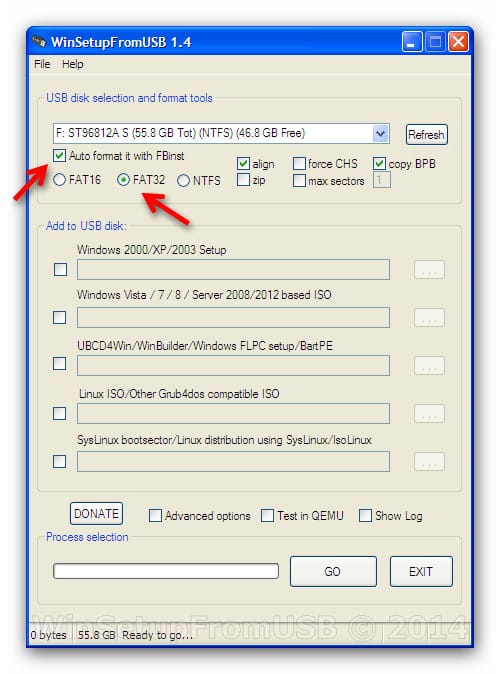
Step 3. In the next step, you need to select the operating systems.
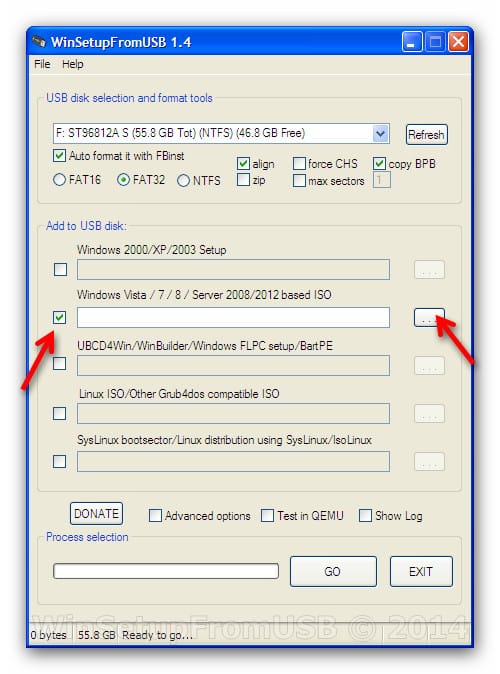
Step 4. Once done, click on ‘Go’ and wait for few minutes until WinSetupFromUSB creates the multiboot drive.
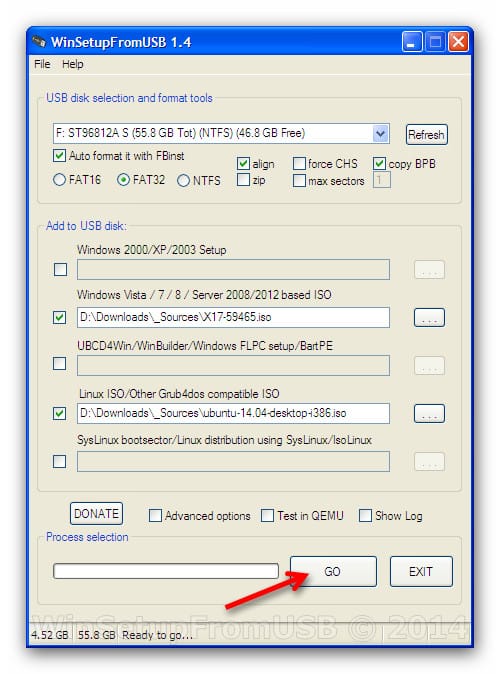
That’s it, you are done! This is how you can use WinSetupFromUSB to install multiple bootable operating systems on a USB stick.
So above discussion is all about How To Install Multiple Bootable Operating Systems on One USB. These are the four best methods to create a multiboot USB Stick. Hope this article helped you! make sure to share it with your friends as well.


